
Availity Provider Portal Now Features Reporting Capabilities
Effective Date: Oct. 17, 2026
Health Plans Affected: Advantage MD, Employer Health Programs (EHP), Priority Partners, US Family Health Plan (USFHP)
Type of Change: Availity Enhancement
Explanation of Change:
Effective Oct. 31, 2026, HealthLINK, our legacy provider portal, will officially be decommissioned. After this date, HealthLINK will shut down, and all provider reporting must be retrieved through Availity Essentials. Availity will feature reporting capabilities starting October 17.
What you need to do now
Please review the instructions below based on your organization's Tax Identification Number (TIN) structure:
Single-TIN Organizations
Johns Hopkins Health Plans was able to pre-register single-TIN organizations when we could match your Availity TIN and organization name to our provider data. If your organization was not pre-registered, your organization administrator will need to follow the registration steps for a multi-TIN organization. Otherwise, your Availity organization administrator already has access and can use the provider reporting function.
Multi-TIN Organizations:
Registration is required before access can be granted.
- Your Availity organizational administrator must navigate to the Johns Hopkins Health Plans Payer Space within Availity Essentials.
- Select the “Applications” tab.
- Select the "Provider Reporting" tile.
- Complete the registration form.
Once submitted, Johns Hopkins Health Plans will review the request and grant access upon approval. Step-by-step instructions on how to complete this registration process are outlined below.
To prevent any interruption in retrieving your reports, please ensure your administrator completes any necessary registration or user provisioning before October 17.
How to access the Availity Provider Reporting Tool
This self-service tool, now accessible directly within Availity Essentials, is designed to deliver timely, actionable data to support your day-to-day operations — including roster reconciliations, performance and quality metrics, and operational reporting — all within a secure, centralized workspace.
Please follow the steps below to locate and launch the reporting tool:
- Log In to Availity Essentials
Go to availity.com and log in using your established Availity credentials. If your organization is not yet registered, click Register on the Availity homepage to create an account at no cost. - Navigate to Payer Spaces
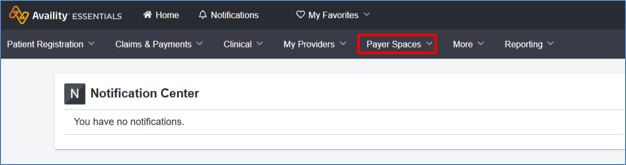
From the main landing page, locate the top navigation bar and select Payer Space
- Select Johns Hopkins Health Plans
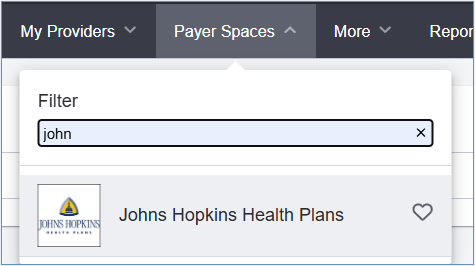
From the list of available payer cards, find and select Johns Hopkins Health Plans.
- Open the Applications Tab
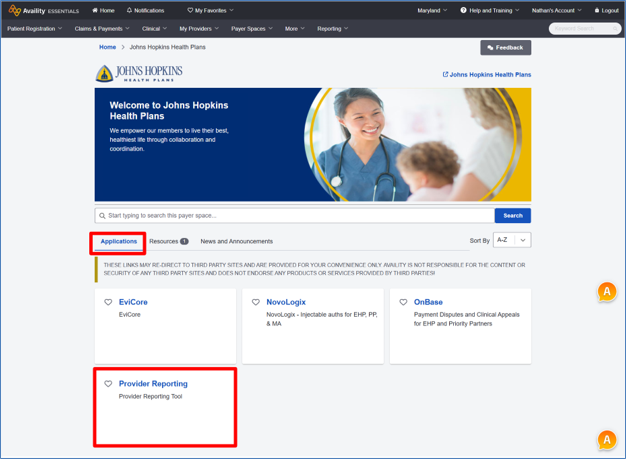
Once inside the Johns Hopkins Health Plans Payer Space, ensure you are on the Applications tab (located along the sub-navigation menu). From here, locate and launch the Provider Reporting application tile.
Access & user permissions
If you or staff members within your organization cannot view the application tile or receive an access-restricted notification, please contact your organization’s Availity Primary Access Administrator (PAA). Your PAA has administrative control to assign the appropriate reporting and analytics roles to your user profile.
Need support?
For technical assistance with Availity Essentials portal navigation or account setup, please reach out to Availity Client Services at 1-800-AVAILITY (282-4548). For questions regarding report data or health plan policy, please contact your dedicated Johns Hopkins Health Plans Provider Relations representative.